
PotaLive - Voice Chat Room
Perfect LabSocial
3.834.00 Reviews
- Version
- 2.00.148
- Installs
- 500.00K
- Age Rating
- Teen
Screenshots

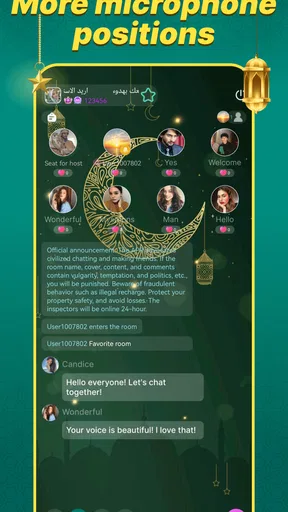


Our Review of PotaLive - Voice Chat Room
 Analysis by Appyee
Voice chat can feel more natural than typing, but it also asks more from an app than simply putting people in the same room. You need to find conversations that suit you, understand how the room works, control when your microphone is active, and decide how much social energy you want to spend. I approached PotaLive with that in mind, treating it as a voice-first social app rather than another messaging service with calling added on later.
My overall impression is that PotaLive is most useful when you want casual, live conversation and do not want to plan a formal call. It is free to install, aimed at a Teen audience, and developed by Perfect Lab. The app belongs to the social category, and its central idea is straightforward: spend time in voice chat rooms, listen to ongoing conversations, and join when you feel comfortable. That simplicity is appealing, although it also means your experience depends heavily on the quality of the rooms and the people you meet.
I found it easier to judge this app by looking at the small habits that make voice communities enjoyable. The first few minutes matter, microphone discipline matters, and knowing when to leave matters. PotaLive can be a pleasant place for spontaneous interaction, but it is not automatically the best choice for private calls, structured teamwork, or people who prefer carefully edited communication.
How a normal PotaLive session feels
The basic workflow is familiar: open the app, look through available voice spaces, choose one that matches your mood, and decide whether to listen or speak. That last choice is important. I would not treat a room like a group text where every arrival needs an immediate message. In a voice room, listening first gives you a better sense of the pace, the tone, and whether the conversation is actually welcoming.
A realistic everyday use case is a quiet evening when I want company while doing something simple at home. I might enter a room, keep my microphone off while I learn who is talking, and contribute only when I have something relevant to add. This feels less demanding than arranging a call with friends, because nobody has to coordinate a time or wait for everyone to join. The trade-off is that the conversation may already be moving in a direction that does not interest me.
That makes room selection more important than the app’s basic controls. A lively room is not automatically a good room for every listener. If several people speak over one another, a newcomer can struggle to find an opening. If the conversation is too quiet, the app may feel empty even though the room is technically active. I recommend giving a room a short listening period before deciding whether to participate.
For first-time users, the most useful routine is deliberately slow. Check the room name and visible context, enter with the microphone muted if that is the available starting state, and listen before speaking. When you do talk, keep your first contribution short. This is not about being formal; it simply gives the room a chance to respond without forcing you into a long introduction.
The app is better suited to spontaneous social contact than to a private conversation with one specific person. If your main goal is to call a family member, coordinate a work project, or share confidential information, a conventional private messenger or dedicated meeting app is usually the safer and more predictable choice. PotaLive’s appeal is the open, room-based feeling, not the controlled structure of a private call.
What I would check before joining regularly
I would begin with the microphone and notification controls. Voice apps can become irritating when sound starts at the wrong moment or when alerts interrupt whatever else you are doing. Before settling into a room, I would confirm how to mute myself, how to leave quickly, and how to reduce interruptions. These are simple checks, but they prevent the most common awkward moments.
I would also pay attention to how much personal information I reveal in conversation. A voice can feel personal very quickly, even when the room is casual. I avoid sharing my full name, location, workplace, contact details, or anything that would make an off-platform conversation uncomfortable. The best voice-chat habit is to keep your first interactions friendly but deliberately general.
The Teen content rating is another reason to use ordinary online caution. It does not mean every room will suit every teenager, nor does it replace personal judgement. Younger users should understand that a live room is less predictable than a written post: tone can change quickly, people can misunderstand jokes, and a conversation can become uncomfortable without much warning.
Because PotaLive is free to use, I would start without spending anything. The app includes in-app purchases ranging from $0.99 to $199.99 per item, so I would treat paid options as optional rather than part of the basic test. A sensible approach is to use the free experience long enough to decide whether the rooms, pace, and community style are genuinely useful before considering any purchase.
That price range deserves attention because voice social apps can encourage impulse decisions. A paid item may feel attractive after a particularly enjoyable conversation, but enjoyment in one room does not necessarily mean the whole service fits your routine. I would set a personal spending limit in advance and avoid buying anything simply to gain attention or approval from other users.
Settings that make the experience easier to manage
Experienced use starts with repeatable checks rather than constant adjustment. I like to establish a small pre-room routine: lower background noise, check the microphone state, review notifications, and keep the exit action easy to find. This is especially useful when moving between a quiet room and a busy one, because the same audio setup will not feel equally comfortable in both.
Your surroundings matter more in PotaLive than they do in text-based social apps. A fan, television, keyboard, or nearby conversation can make your voice tiring to follow. I would use headphones when possible and speak from a consistent distance from the microphone. That is not a special feature of the app, but it directly improves how other people experience your presence.
I also recommend separating listening time from speaking time. If I am multitasking, I keep the app in a listening role and avoid trying to follow a room while holding another conversation. If I want to participate, I give the room my attention for a while. This simple boundary reduces accidental interruptions and makes it easier to notice when a conversation has naturally ended.
Notifications deserve a similar boundary. Real-time social apps can pull attention away from work, study, meals, or sleep. I would keep alerts limited to periods when I actually want spontaneous interaction. If the app becomes part of a daily routine, a fixed time window is healthier than reacting to every prompt.
One useful technique is to decide what you want from a session before entering. There are three different goals: finding background company, meeting new people, or having a focused conversation. The same room may work for one goal and fail for another. Going in with a clear purpose makes it easier to leave when the room is not a good match instead of staying simply because you have already joined.
Faster patterns for regular users
Once the basic workflow feels familiar, the biggest improvement comes from reducing hesitation. I would keep a short mental checklist rather than repeatedly exploring every control: choose a room, listen briefly, confirm my microphone state, contribute once, then reassess. This pattern is faster than entering loudly or remaining silent for so long that joining feels awkward.
Short contributions work particularly well in rooms with several active speakers. A clear greeting or relevant comment gives others an opening without competing for the entire conversation. If someone responds, I can continue. If not, I can keep listening or leave without having invested too much energy.
Another practical pattern is to use the room as a filter for compatibility. Instead of trying to make every room work, I notice whether people take turns, whether newcomers receive a reasonable welcome, and whether the discussion has a subject I can actually follow. This helps me avoid confusing activity with quality. A room full of voices may still be a poor fit if nobody can hear one another.
I would also create a simple exit habit. When the conversation becomes repetitive, uncomfortable, or too noisy, leaving is a normal part of using a social app. You do not need to justify every departure. Treating the exit as routine prevents the common mistake of staying in an unsuitable room because leaving feels socially rude.
For users who return often, consistency is more valuable than constant experimentation. Use the same comfortable audio setup, join around the same kind of free time, and remember which room styles suit your personality. PotaLive is easier to enjoy when it becomes a controlled part of your routine rather than an endless stream of random rooms.
There is also a useful distinction between being visible and being involved. You do not have to speak constantly to get value from a voice room, but you should not expect deep connection from passive listening alone. I would alternate between quiet observation and small, intentional contributions. That balance feels more natural than either dominating the room or never participating.
Where the app reaches its limits
The main limitation is that the quality of the experience is social rather than purely technical. A well-designed room can feel warm and effortless, while a disorganized room can make the same app feel frustrating. PotaLive cannot guarantee that every conversation will be interesting, balanced, or welcoming. Users who want a predictable experience may prefer a private group on a familiar messaging platform.
Voice communication also leaves less room for editing. In text, I can rewrite a sentence before sending it. In a live room, tone and timing carry as much meaning as the words. That can be liberating for relaxed conversation, but it can also create misunderstandings. I would avoid sensitive arguments, personal accusations, and important decisions in a casual voice room.
Privacy is another practical limit. Even without sharing identifying details, speaking can reveal more about you than a short text message. Your voice, habits, background sounds, and reactions all contribute to how others perceive you. Anyone who is uncomfortable with that level of exposure should choose a text-first community instead.
The app may also be a poor fit for users who need reliable collaboration tools. PotaLive’s social-room approach is not the same as a structured meeting environment with agendas, formal moderation controls, document sharing, or task tracking. For work, classes, customer support, or organized projects, a dedicated communication service will usually be more appropriate.
Phone compatibility is reasonably accessible because the current version, 2.00.148, supports devices running Android 6.0 or later. That broad system requirement is helpful for people using older Android hardware, although the quality of a voice session will still depend on the phone’s microphone, headphones, connection, battery condition, and surrounding noise. A compatible device does not automatically produce a comfortable conversation.
The app has reached over half a million installs, which suggests that it has found an audience beyond a tiny experiment. Its average rating is 3.8 from around 3,400 ratings, so I would describe the reception as mixed but reasonably established rather than universally praised. I would not use the rating alone to predict my experience; room culture and personal expectations matter more here than they would in a simple utility app.
Who should try it and who should skip it
I would recommend PotaLive to someone who enjoys meeting people casually, likes listening before speaking, and wants a voice-based social space without arranging every conversation in advance. It can also suit people who find endless text threads tiring and prefer the warmth of real-time speech.
I would be more cautious about recommending it to someone who dislikes unpredictable social situations, needs strong privacy, or wants a dependable one-to-one calling tool. It is also not my first choice for professional communication, serious support conversations, or anyone who expects every room to have a clear topic and orderly turn-taking.
Parents and younger users should discuss boundaries before regular use. I would encourage keeping identifying information private, leaving rooms that feel uncomfortable, and treating requests to move conversations elsewhere with caution. Those habits are more important than finding a perfect setting inside the app.
My verdict after using the voice-first approach
PotaLive works best when I treat it as a casual meeting place, not as a replacement for every other communication app. Its strength is immediacy: I can enter a room, listen to a live conversation, and take part without preparing a long message or organizing a scheduled call. That makes it a natural option for relaxed social time.
Its weaknesses are equally clear. The room experience can vary, live speech is harder to control than text, and open social interaction requires sensible privacy boundaries. The free entry point makes it easy to test, but the presence of in-app purchases means I would keep spending intentional and separate from the fun of a particular conversation.
For me, the deciding question is not whether PotaLive has enough activity, but whether its style matches how I like to socialize. If I want spontaneous voice contact and am willing to listen, choose carefully, and leave when a room is not right, I can see the appeal. If I need privacy, structure, or predictable communication, I would choose a more conventional alternative.
Perfect Lab has built an accessible social app around a simple habit: drop into a room and talk when the moment feels right. With thoughtful microphone use, controlled notifications, and realistic expectations, that habit can become enjoyable rather than overwhelming. PotaLive is worth trying for open-ended voice conversation, but its real value depends on the rooms you choose and the boundaries you keep.
Verdict
Strengths of PotaLive - Voice Chat Room
- Easy way to join live voice rooms and meet new people.
- Supports casual conversations without requiring video.
- Room-based format makes it simple to find shared interests.
- Interactive features help keep conversations lively.
- Useful for socializing when you prefer speaking over typing.
Limitations of PotaLive - Voice Chat Room
- Public rooms may include unfamiliar or unpredictable conversations.
- Voice quality can vary depending on network conditions.
- Busy rooms may feel difficult to follow or participate in.
- Some features or rooms may require in-app purchases.
- Always-on social interaction can raise privacy concerns.
Similar Picks in This Category
View All
Meta Platforms, Inc.4.6

Instagram4.0

Likee-Live, Chat & Party Games
Likeme Pte. Ltd.4.4

Facebook Lite
Meta Platforms, Inc.4.5

TikTok - Videos, Shop & LIVE
TikTok Pte. Ltd.4.0

Moj: Free Short Drama & Reels
ShareChat4.1
Frequently Asked Questions
What is PotaLive - Voice Chat Room?
PotaLive is a social communication app centered on live voice chat rooms. Users can enter public or themed rooms, listen to ongoing conversations, and participate using their microphone when permitted. Depending on the room and available features, the app may also include user profiles, text messaging, virtual interactions, and community activities. It is designed for casual conversations, meeting people, and joining live discussions rather than traditional one-to-one calling.
Do I need an account to use PotaLive?
PotaLive may allow limited browsing before registration, but an account is generally required to participate fully in voice rooms, create a profile, send messages, follow users, or access social features. During setup, the app may request basic information such as a nickname, profile image, age, or login details. Before registering, review the permissions and privacy policy, and avoid sharing sensitive personal information with people you meet in public rooms.
Is PotaLive free to download and use?
PotaLive can generally be downloaded without an upfront purchase, but availability of specific features may depend on the app’s current version, region, and account status. Social voice-chat platforms commonly offer optional in-app purchases, virtual gifts, premium items, or other paid services. Check the app store listing for current pricing and carefully review any purchase confirmation, especially if the application uses virtual currency or recurring subscriptions.
Is PotaLive safe for children and teenagers?
Parents should review PotaLive’s age rating and privacy information before allowing a child or teenager to use it. Live voice rooms can contain unpredictable conversations, user-generated content, and contact from strangers. Even with moderation tools, inappropriate language, scams, or unwanted interactions may occur. Use privacy settings, avoid sharing location or contact details, block and report suspicious accounts, and consider parental controls or supervised use.
What permissions does PotaLive require, and can I control them?
Because PotaLive focuses on live voice communication, microphone access is likely needed when you want to speak in a room. The app may also request notifications, storage or photo access for profile customization, and other permissions depending on the device and version. You can manage these permissions through Android or iOS settings. Denying optional access may limit certain features, but it should not prevent you from reviewing the app’s basic information.
